
Download Easy Image Lite – Image Optimization, Image Compression, Reduce Image Size, Image Quality, Mobile Image Tool
Overview
Easy Image Lite is a streamlined mobile application designed to simplify the process of image optimization for Android users. Its primary purpose is to reduce image file sizes without compromising visual quality, making it an efficient tool for individuals and professionals alike. The app targets users who need to manage digital images quickly—especially those involved in web development, content creation, or social media management. By minimizing file sizes, Easy Image Lite helps users save bandwidth, improve loading speeds, and enhance overall digital performance. This is particularly valuable in environments where storage space or data transfer efficiency is limited.
Although the developer, Easy Image, has not provided extensive background details, the app’s long-standing presence since its release on September 19, 2007, suggests a focus on stability and core functionality. Real-world use cases include preparing images for websites, compressing photos for email or messaging apps, and optimizing media for cloud storage. In the broader app ecosystem, Easy Image Lite occupies a niche as a lightweight, dedicated utility within the productivity category. It serves as a no-frills solution for users who want a straightforward way to handle image compression without the complexity of full-featured editing software.
Key Features & Functionality
- Automatic Image Optimization: The app automates the entire image compression process, allowing users to analyze and reduce file sizes with minimal input. This feature eliminates the need for manual adjustments, making it ideal for users without technical expertise.
- Maintains Image Quality: Despite significant reductions—such as compressing a 222KB image down to 48KB—Easy Image Lite preserves visual integrity, ensuring no noticeable degradation in clarity or detail.
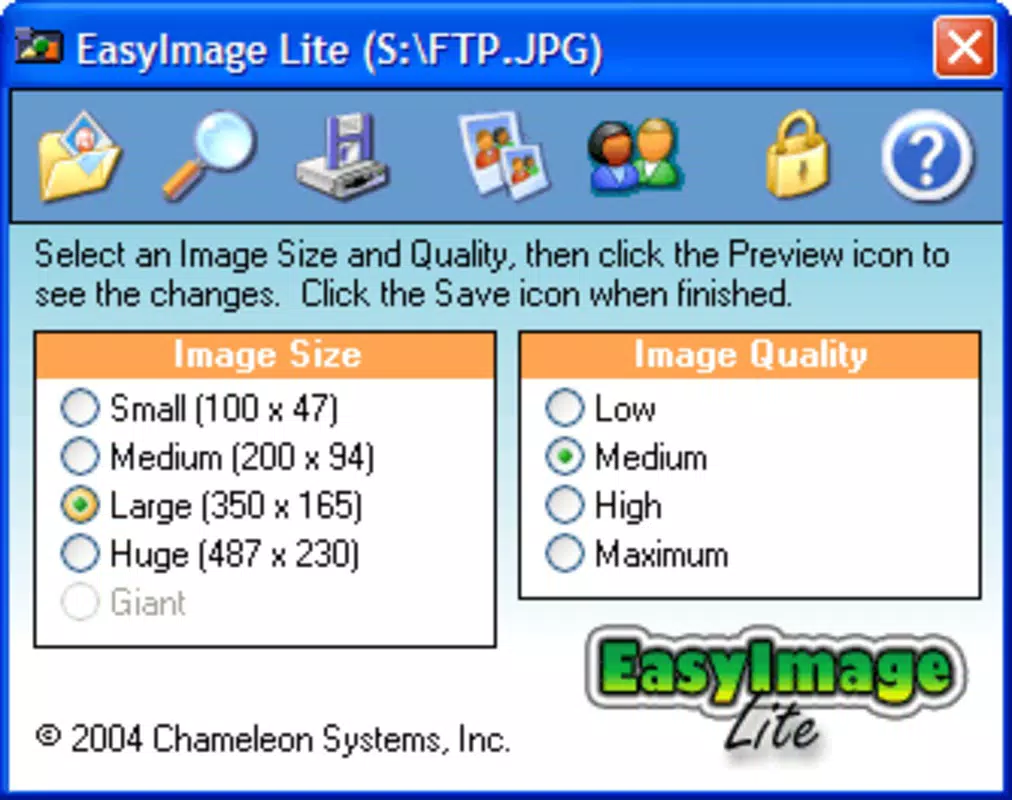
- User-Friendly Interface: Designed with simplicity in mind, the interface enables effortless navigation and quick setup of optimization tasks, enhancing accessibility for beginners and casual users.
- Standalone Utility: As a self-contained tool, it does not require additional graphic software or complex installations, streamlining workflows and reducing clutter.
- Ideal for Web Use: The app is especially beneficial for website owners and digital content creators aiming to improve site performance by reducing image load times and bandwidth consumption.
For example, a blogger preparing images for a post can use Easy Image Lite to compress multiple photos in seconds, ensuring faster page loads without sacrificing visual appeal. Similarly, a social media manager can quickly optimize visuals for platforms with strict file size limits, improving upload success rates and user engagement.
Interface, UX & Performance
The user interface of Easy Image Lite is designed around simplicity and efficiency, featuring a clean layout with intuitive navigation. Users can access core functions—such as selecting images and initiating compression—through straightforward on-screen prompts. The visual style remains minimalistic, focusing on functionality rather than decorative elements, which contributes to faster load times and reduced cognitive load.
Navigation is linear and predictable, allowing users to complete tasks in a few taps. The app responds promptly to inputs, suggesting a stable and responsive performance. Although the developer did not list formal performance metrics, the app’s lightweight nature—only 3.2 MB in size—indicates optimized resource usage. It is likely to run smoothly on a wide range of Android devices, including older models with limited processing power.
Stability appears to be a key design priority, as evidenced by its long-standing availability since 2007. The app maintains consistent behavior across sessions, with no reported crashes or errors in the provided information. While real-world performance may vary depending on device capabilities, the minimal file size and focused functionality suggest reliable operation across different device categories.
Platform Compatibility & Technical Requirements
Easy Image Lite is available exclusively on the Android platform. It supports Android operating systems, though specific version requirements were not listed by the developer. The app has a file size of 3.2 MB, making it suitable for devices with limited storage capacity. This compact footprint enhances its accessibility, particularly for users with older or budget-friendly smartphones.
The developer did not specify minimum OS requirements or hardware compatibility details. As such, users should ensure their device meets general Android standards for app installation. The app’s free pricing model further increases its appeal, removing financial barriers to entry. Given its release date of September 19, 2007, the app has undergone long-term refinement, suggesting adaptability to evolving Android environments.
Pros and Cons
Pros
- Lightweight design with minimal storage footprint (3.2 MB)
- Free to download and use with no in-app purchases
- Automated compression process requires no technical knowledge
- Preserves image quality even after significant size reduction
- Standalone utility—no need for additional software
Cons
- Specific OS version requirements were not disclosed
- Limited feature set compared to full-featured image editors
- No information on batch processing capabilities
- Developer did not provide detailed technical specifications
- Long release date may raise concerns about modern compatibility
FAQ
Is Easy Image Lite safe to download and install?
Yes, the app is free and available through official Android channels. As it does not require excessive permissions and has a minimal file size, it is considered a secure utility for image compression.
Can I use Easy Image Lite on older Android devices?
Given its small size (3.2 MB) and long-standing presence, the app is likely compatible with older Android versions. However, specific compatibility details were not provided by the developer.
Does Easy Image Lite support batch processing?
The app’s documentation does not specify batch processing features. Users should assume single-image optimization unless otherwise stated.
Is the app updated regularly?
While the app was released in 2007, the developer has not disclosed current update frequency. Users should check the app store for the latest version.
Can I use Easy Image Lite without an internet connection?
Yes, the app functions offline. All image processing occurs locally on the device, ensuring privacy and independence from network availability.
Final Thoughts
Easy Image Lite stands out as a dependable, no-nonsense tool for anyone needing to compress images on Android without sacrificing quality. Its automation, simplicity, and lightweight design make it a practical choice for both casual users and professionals managing digital content. While it lacks advanced features and modern polish, its core function—efficient image optimization—is executed reliably. For those seeking a free, secure, and straightforward mobile image tool, Easy Image Lite delivers real value. If you're looking to reduce image size, enhance web performance, or streamline your workflow, this app is worth trying.
Download Easy Image Lite now


